Jun 4
2021
2021
Imaginary maps in 3D
Playing around with three.js to make the 3D version of this post in the browser.

Playing around with three.js to make the 3D version of this post in the browser.
Option 1: Only allow "widely used" outbound connections
Problem: Browser extensions are dangerous because they can exfiltrate personal information.
Proposal: Only allow outgoing data transmission if a large number of other browsers with the extension are making exactly the same request. For example, if an ad blocker is updating Easylist, then the data transmitted would be the domain, the URL, and the GET parameters. These would need to exactly match with a large number of other people before the connection could be established.
Objection: There is a request permission bootstrapping problem. Proposal: make requests retryable and/or notify the extension when it is allowable to make the request. Downside: it would at the least require the extension to handle intermittent connection failures.
Objection: This leaks information about who is using what extensions and the specific configuration of the extension to a third party. Proposal 1: This can be eliminated, at significant cost, by using a consensus protocol in which the extensions are untrusted, the users' browsers are trusted, requests are signed using per-extension keys, and peer-to-peer communication between browsers for the purposes of authenticating outbound connections takes places over a Tor-like privacy-preserving network. Proposal 2: It can instead be ameliorated by clumping a number of extension requests together, such that the third party can only prove that the browser is requesting one of connection types A, B, or C from one of extensions X, Y, or Z.
Option 2: Whitelist outbound connections
Proposal: For something like an adblocker, it should be possible to whitelist data using a technology like taint analysis. For example, the list of URLs containing ad updates is only modified in two ways: by an extension update, and by the user manually editing it. Therefore connections which contain only information derived from this list can be automatically allowed. Objection: covert channels would be trivial (e.g. by repeatedly making a connection to the URL on line number n in the whitelist, where n is the ascii code of the key the user has just typed). Proposal: Rate-limit the number of connections such that the amount of exfiltrable data is extremely low. Proposal: Only permit connections to be made in a statically-agreed sequence.
Option 2 generalisation: Whitelist outbound data
Proposal: Expanding the data-tainting idea, allow transmission of data which can be directly tied to user input in various ways. For example, from typing in an agreed-upon DOM element (which could then not be manipulated by either the site in question or the browser extension), or making connections to URLs which already appear on the page. This would allow a wider variety of extensions. Objection: connections are likely to contain information from more than one source. Proposal: a data description language which outlines the sources which would contribute to the information included in a single connection.
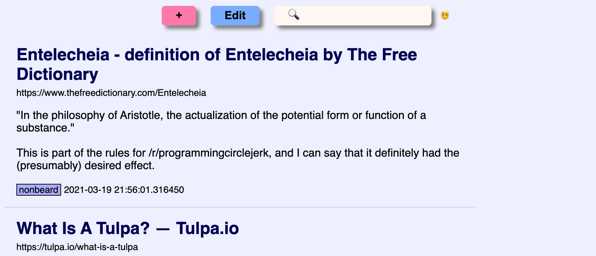
Boyfriend of Zelda is a bookmarking site, like Delicious or Pinboard. Rather than add your site bookmarks in your browser, add them to a webpage with a small description and, optionally, tags. This makes them searchable (and shareable, though I can't see why anybody would be interested in my bookmarks. Maybe your bookmarks are super compelling though).
It's very simple, so the best way to get a feel for it is to check it out or install it yourself. I'm running it for myself here, and you can get full instructions on setting it up for yourself here.
Majordummo is a mailing list manager for small, private mailing lists. Its primary goal is simplicity and is therefore implemented as a single Python file which uses no third-party packages. Because it leverages Python’s excellent standard library the entire thing is a little over 200 lines of fairly readable code. Its unofficial motto is “if I could have done the entire thing in Postfix, I would”.
To use it, just download deliver.py, customise your configuration file, and set your mail delivery agent to run it when mail arrives (e.g. by putting it in /etc/aliases — see the README for details).
Majordummo is for a very specialised niche. As an example, it has no externally-accessible configuration. This means that adding or removing people from the mailing list requires editing its configuration file. If this sounds like a feature for your purposes, then you might wish to give it a try. If this sounds ridiculous, then you may want to try Majordomo instead.
I wrote this because I wanted something to manage a mailing list for known group of recipients and was put off by the complexity of existing options. The heyday of mailing lists is long past — I don’t need customisable templates, a Web interface, subject prefixes, or even bounce messages. In fact, features are a liability -- aside from being a security risk by increasing attack surface, they require configuration (even to turn off), which is not always easy to get right, and, sometimes, they can increase resource usage. A standard Mailman installation, for example, requires a daemon and a website. In the best case, if you have minimal needs, you could customise another piece of software to act like Majordummo -- or you could just use Majordummo!
Here in London, we've been in coronavirus lockdown tier ∞+n for a little while now, and I haven't had a decent haircut in quite some time, but I still need to appear on video calls. So I made a hair censor.
The code uses OpenCV, which makes it very simple -- it finds faces using a Haar cascade and then blurs squares in an area around the face. I used v4l2loopback and an OBS plugin to have it show up as a camera under Linux, which meant I could then pipe it into Zoom, Teams, Skype and so on (for some reason I am using all of these).
I wrote ON ERROR RESUME NEXT for Python as a proof of concept. Code is here.
On the whole, BASIC is an unfairly maligned programming language. By the 90s it had come a long way from the GOTO-peppered, line-numbered morass which earned Dijkstra's ire. Modern BASICs have great support for structured programming -- not just procedures and while loops, but classes and modules, too. However, there is one famous BASIC feature which is every bit as evil as it sounds.
Errors in early BASICs tended to be fatal. This meant that writing robust programs meant doing a lot of careful checking before any potentially-dangerous operation. (Writing non-robust programs meant getting used to restarting them a lot). In many ways, the error handling environment of BASIC was more difficult to work with than other languages of the time, such as C, with the result that many people wished instead that they could just make errors go away so they didn’t have to think about them. Enter ON ERROR RESUME NEXT.
When a BASIC interpreter encounters ON ERROR RESUME NEXT, it stops reporting errors to the program. That’s it. Oh sure, they still happen, but you don’t need to worry about them now. When an error occurs BASIC will just continue on the next line of the program. Open a file which doesn’t exist? No worries. Divide by zero? Sure. Every path is the happy path now. (1)
So anyway, I've been deep in Python internals recently, and one night while drinking heavily (2) the thought occurred to me: could we implement ON ERROR RESUME NEXT in Python? Could we just have the interpreter swallow exceptions and keep going? Turns out we pretty much can!
Yes, I did actually write this. No, I don’t recommend anyone use it. But the implementation and revealed information about how Python works is pretty interesting.
Python uses the “termination” model of error handling: an exception handler can find out what happened and continue execution at an outer level, but it cannot repair the cause of the error and retry the failing operation.
— Python documentation, sweet summer child
When something goes wrong in Python, it raises an exception. If the exception isn’t handled by the function which generated it, it propagates back up the call stack until it reaches an exception handler. If the exception handler can’t handle that type of exception, it continues its journey upwards. If there are no suitable exception handlers, the exception propagates all the way up to the top level, and the Python interpreter itself handles it by printing a traceback and exiting. Very BASIC-like, that part.
The interesting thing about Python is that its tracebacks are very rich. As well as the line number of the failing instruction, they also contain one frame object per traceback level. Frame objects are the magic on which the present abomination turns, because frame objects contain a pointer to the compiled code that was running, the exact Python opcode that failed, the locals and globals which were active in that frame… in fact, almost everything one might need to re-start execution.
If the above has given you a terrible idea, then we should be friends. What it means is that if function1 calls function2() and function2 throws an exception, the traceback will contain frame objects for function1 and function2. Both functions' local variables, instruction pointer, and so on are all faithfully preserved in their respective frame objects, so if we were to somehow re-enter function2, restoring all its state, and jump directly to the the line of code after the one which threw the exception, we could effectively RESUME NEXT.
Basically, then, we are going to
The top-level function will call all the way down the call hierarchy pulled out of the traceback, finally reaching the function which raised the exception. That final, leaf function will continue on the line after the one which raised. Simple! ON ERROR RESUME NEXT.
You might be thinking (I was), “Nicholas, this isn’t very BASIC if I have to wrap all our code in an exception handler. That’s exactly the sort of error shenanigans I was hoping to avoid!” Well, fortunately, Python offers sys.excepthook as a last-resort way of handling top-level exceptions. If sys.excepthook is set, exceptions which reach the top level are passed to it. So we can implement our RESUME NEXT from there. More on this later. For now, let’s dive into the horrifying world of Python’s four different stacks.
There are lots of implementations of Python, but unless you’re doing something quite specialised you’ll be using the one available from python.org known as CPython. CPython bytecode is stack-based. In fact, Python’s creators loved stacks so much, they used four of them. They are:
I wrote above that tracebacks contain “almost everything” required to re-run the code causing an exception. Guess what tracebacks don’t contain? That’s right, the stacks!
(Except the Python call stack, of course. We get that one.)
The real killer is the value stack. Because Python uses the value stack for everything, it’s really important that we restore it. As an example, consider this code snippet:
def f(value):
    result = explodey(value)
    [ more processing here ]
    return result
This disassembles to the following bytecode:
    0 LOAD_GLOBAL 0 (explodey)
    2 LOAD_FAST 0 (value)
    4 CALL_FUNCTION 1
    6 STORE_FAST 1 (result)
    8 LOAD_FAST 1 (result)
    10 RETURN_VALUE
Let’s say that explodey throws an exception, resulting in CALL_FUNCTION failing. We want to resume at the next instruction (3) here, which is STORE_FAST. So we will just jump right back into the function at STORE_FAST, index 6, and… immediately hit a stack underflow error because STORE_FAST is expecting to pop something (the thing it’s storing fast!) off the value stack.
Okay, no problem. The value stack is there, in the frame object. It’s just not obviously accessible to us. Once we have the value stack and the value stack pointer, which tells us how many value stack objects are active, we can pull that number of objects out of the frame and push them back onto the stack when we call the function again to retry. Sounds… simple?
You can’t. Python doesn’t expose this information in any way, and in fact it couldn’t even if it wanted to because the stack pointer is a local variable stored on the interpreter’s (C) stack, and by the time we’ve got the traceback those (C) stack frames have disappeared.
Alright, so how do we get this information if it’s literally not there? Well, it is there. In a way.
Look again at the disassembly above. We see LOAD_GLOBAL, LOAD_FAST, and so on. Looking at the documentation for these opcode we see that both of these push a value onto the stack. CALL_FUNCTION (1) consumes the number of arguments supplied (1), plus the callable itself, but it then pushes the function’s return value. STORE_FAST pops a value. And so on.
For this function, execution stopped at CALL_FUNCTION. That means we executed LOAD_GLOBAL (add 1 to the stack pointer), LOAD_FAST (add 1 again), and CALL_FUNCTION (subtract 1 for the argument, subtract another 1 for the callable, then add 1 for the return code). So just by looking at the code, we see that by the time CALL_FUNCTION has finished, we have one value on the stack.
Can we formalise this? Of course we can, in the form of an abstract interpreter. We “execute” the Python bytecode, but the only thing we keep track of is the current stack depth. When we reach the instruction of interest (i.e. the one which produced the exception, i.e. CALL_FUNCTION in this example), we stop.
Abstract interpretation sounds hard, but it’s actually easier than you might expect. For example, the stack level before a loop is the same as the stack level after a loop, no matter how many times the loop executes. So we don’t need to worry about how many times a loop will execute. No matter what a function does, CALL_FUNCTION will always push exactly one value. So we don’t need to trace our way through function calls. We do need to worry about opcodes like JUMP_ABSOLUTE, which change the program counter, but that’s relatively straightforward. We also need to worry about conditional jumps — but we can handle those by trying both options (jump taken and jump not taken), one after the other. Our abstract interpreter just wombles through the code, not worrying too much about what it does but maintaining a stack pointer, until its instruction pointer matches the one we’re interested in. Then we stop interpreting and return the stack depth at that point.
Alright! So now we know the number of items we can expect to have on the value stack! Now to retrieve them!
You can’t. Python doesn’t expose the value stack to Python code in any way.
Soooo it’s time to pull out the ctypes module and get digging. The frame object is represented in CPython by a struct _frame — and if you visit that link you can see a tantalising PyObject **f_valuestack. (There is also an f_stacktop, which would be really handy to find the number of items on the stack, if Python ever set it!). There are a couple of caveats to just gleefully pulling values out of f_valuestack though. The most important is that CPython uses NULL return values internally (and in extension modules) to signal an exception. If an opcode which writes to the stack produces an exception, the stack value at that point will be NULL, so we need to take care to replace that with something sensible, like None.
At first it might seem like quite a limitation to have stack values nulled out like this on exceptions, but it makes sense: what is the “return value” of a function which raises an exception? Any possible answer has the same information content (i.e. none), so we don’t lose anything by having to deal with NULL.
As I hinted above, we can “re-enter” an exception by patching the code for the functions at every level of the traceback so that it restores the internal state of the function to what it was prior to the exception and then resumes where it left off. To make this happen we need to patch the bytecode for each function, and because you can’t modify bytecode what that actually means is that we’ll be creating temporary proxy functions with new bytecode. Doing things this way is also safer, because we can restore different states for the same function call in different frames (think recursion). There are a few things we need to restore:
It’s also easy to forget that traceback frames don’t necessarily represent functions. In fact, the first level of a traceback is quite commonly a module object. So we can’t make function-specific assumptions (such as that locals() is unique or even is distinct from globals().
Well yes, about that… it’s not actually vital to get a simple proof of concept going, and, well, I guess you can see where I’m heading with this. It should be fairly straightforward to rebuild it using the same abstract interpreter that calculates stack depth, though, because all the important information (jump targets) is static.
Actually, the most fiddly part of this is also a rather boring bit: we will be re-entering our call stack from the sys.excepthook exception handler, but if that exception handler itself throws an exception then Python will unceremoniously kill us off. What this would mean is that we can't ON ERROR RESUME NEXT more than once. The solution, of course, is to wrap the code we're resuming in a try: except: block. This adds some complexity around patching already-patched functions, which I handle by keeping a copy of the original function around. See the code for more details. And speaking of the code...
The code is at https://github.com/nfd/on_error_resume_next. A good place to start reading is at the beginning of _resume, which is called from sys.excepthook with a fresh traceback.
Because it’s reaching around inside CPython internals, it requires, specifically, CPython 3.9. (It may work on 3.8 as well, possibly with some minor changes to the abstract interpreter)
handle = open(“probably doesn’t exist”)
if err():
    return False

val = 42
while more_numbers := input():
    val += int(more_numbers)

import is_this_module_installed
if err():
    # oh no
I wrote an abstract interpreter, bytecode rewriter and patcher, and CPython frame object extractor just for a stupid joke about error handling.
On the plus side, I now know quite a bit more about how Python works internally.
Well, I’m certain there are loads of bugs. There are also glaring omissions (see block stack). Also it’s a terrible idea. But I put all of these things into a program running ON ERROR RESUME NEXT and the answer appears to be True.
The sensitive reader will be disquieted to learn that there is in fact an existing implementation of, effectively, ON ERROR RESUME NEXT in Python. It's called fuckit.py and it works by effectively wrapping every single line of code in a try: ... except Exception: pass block. Which is kind of brutal but presumably significantly more robust than this… thing.
(1) To be fair to ON ERROR RESUME NEXT, what you're supposed to do is check err() in the next instruction, which gives you C-style error handling. But it is of course super tempting to just ignore all the errors instead. Again, rather like C.
(2) I'm pretty sure I was sober, actually, but if I admit that then what's my excuse?
(3) Next instruction? What happened to next line? Well it makes sense to resume on the next line in the function which generates the exception, but not on parent (caller) functions. What if explodey did some useful work in the lines after the exception and managed to return a useful value?

I bought a small e-paper display "hat" for a Raspberry Pi early this year. The whole ensemble is small enough to put next to a mouse pad or stick to a monitor, and while I've not found a practical use for it, it's been really fun to find impractical uses for it. Earlier this year I was using it to display Amiga demos at 0.0003 frames per second, and last night I made an imaginary map generator.
The idea behind map generation is: you generate a random height map, and then decide the water is at. Anything above that height is land. There are lots of different ways to generate the height map; this page gives an interesting overview.
Code is here. Running randomisland.py on a Pi will display one random island per hour, assuming you have the same (inkyphat) display as I do. Alternatively, you can run randomisland3.py on anything and it will output a random map using block-drawing characters on the terminal. Fun things to play with if you're taking this latter option include the choice of nonlinearity (see nonlinear_3col and friends) and the palette (replace INKY with GREYS or FULLCOLOUR).
Recently I replaced the thermal paste in my Macbook Pro 2015. Doing it was straightforward -- I used this guide to know which screws to take out -- but I thought I'd record the symptoms here in case anyone else has a similar problem.
The symptoms were: the laptop would boot or almost boot, but would hang -- display would be alive, but nothing else -- and would usually then turn off within a few seconds (I guess due to some hardware watchdog?) This happened both during normal boot and safe boot. The laptop would stay alive forever if it were just sitting on the pre-boot login screen (and thus, presumably, not taxing the CPU).
In retrospect this was pretty clearly a thermal problem, but everything is clearer in retrospect. :)
In the era of glued-together phones and no user-serviceable parts, it seems anachronistic to fix a laptop with £1 of thermal paste.
I want to stop using Python. I really do. There are lots of interesting languages out there to learn. It's just that Python is so convenient.
Tonight, in an ... hour? or two?, I built an inverted-index search tool for my email. It reads every email in a reasonably-sized (4.2GiB) email folder, decodes MIME, chooses the best format (plaintext or HTML) to index, extracts the text if it's in HTML, extracts the words minus stopwords, and generates a data structure which is a relatively-small 42MiB on disk. Searching this data structure for emails produces correct results in milliseconds. It's several orders of magnitude faster than Apple Mail or Mailmate. And the entire source code including comments and blank lines and so on is 183 lines.
I'd love to say that I wrote this so quickly and so well because I'm a genius programmer, but unfortunately it's pretty clearly just because Python gives me an excellent standard library and a huge ecosystem of extensions, many of which are very well-polished (parsing email and parsing HTML are both notoriously tricky tasks which only look easy). Is there an equivalent ecosystem for any other language?
The Linux kernel is well-known for its syscall ABI stability, which means that the semantics of the kernel system-call interface don't change between releases (apart from non-breaking bug fixes, and the addition of new features). This feature of Linux is so well established that several alternative implementations of the Linux system-call interface exist. Perhaps the most well-known one is FreeBSD's Linuxolator, through which FreeBSD provides a kernel module, linux.ko, which includes a Linux system-call interface implementation. Linux binaries running on FreeBSD are configured to use the Linux syscall interface, rather than the standard FreeBSD one, by changing a pointer in the (kernel level) process structure. On Windows, the Windows Subsystem for Linux also works by trapping system calls and translating them to appropriate Windows NT system calls.
This method, particularly FreeBSD's implementation, is a very integration-friendly way of running Linux binaries: the binary has immediate and direct access to the host file system and network, can start host-native binaries using fork and exec, and so on -- modulo bugs in the implementation, a Linux binary should be behaviourally indistinguishable from a native binary.
By contrast, the typical way to run Linux binaries on a Mac is to use a virtual machine -- use CPU virtualisation features to boot the Linux kernel in its own isolated space, and then run binaries as normal. This has the advantage of compatibility, because you're running real Linux, but it means that the Linux process is rather isolated from the rest of the machine: in particular, it will typically have its own filesystem and network interface, and it runs in its own "world", unable to launch host-native binaries or interact meaningfully with the host system in other ways (indeed, this isolation is a key feature of virtual machines). Even Docker for Mac uses a virtual machine, presumably so that it can be compatible with the many thousands of Dockerfiles and Docker images which assume that they are running on a complete Linux system.
As a POSIX-compatible system (and indeed as a 4.4BSD and FreeBSD derivative), macOS provides very similar core functionality to Linux, so it should be possible to provide a Linux system-call reimplementation which runs natively on macOS. Such a system would provide FreeBSD-like Linuxolator functionality for macOS.
Nonetheless, the virtual-machine approach has its advantages. The narrowness of the the interface provided by a virtual machine monitor means that neat tricks, such as task snapshotting, suspension, and network transparency become possible. The isolation provided by a VM makes it is easy to control things like file visibility, and memory and other resource usage. Finally, the host-specific portion can be relatively generic, relying on POSIX functionality and a host-specific hypervisor interface, rather than hooking directly into the host's system-call implementation, which would allow for portability.
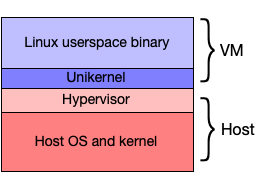
I therefore propose a hybrid implementation: a simple Linux-syscall-compatible unikernel, running in a hypervisor, which communicates with the host to perform network and file operations (using hypercalls). Ideally, the bulk of the syscall complexity can be kept to the unikernel layer. The unikernel would be designed to minimise hypercalls, to improve overall system speed: as just one (classic) example, the frequently-used gettimeofday syscall can be implemented entirely inside the virtual machine. The complete system would look like this:
Linus Torvalds is often quoted as saying "We do not break userspace" (though if you click that be warned that he expresses it in classic Linus style, i.e. by ripping into someone). As discussed above, this means that the semantics of the kernel ABI, as defined by the system-call interface, shouldn't change between versions.
This is an important rule for Linux, because the kernel developers do not co-ordinate kernel releases with user-level code -- even fairly low-level code such as the C library. This is in contrast with other systems, such as FreeBSD and macOS, where new kernel releases are tightly co-ordinated with associated user-space changes. However, Linux's ABI stability has other advantages beyond allowing the kernel developers not to get involved in user-space code: it makes it easy, for example, to implement alternative low-level interfaces to the kernel, as can be seen in the variety of libc implementations supporting Linux, or indeed to bypass a low-level interface and communicate directly with the kernel, as the Go programming language does when targeting Linux. And, on the other side, as discussed above, it means that alternative implementations of the Linux syscall interface do not require continuous changes as new versions of Linux are released.
There are several classes of program which are difficult to get running on macOS, relatively stable (in that they do not require continuous updates), and which benefit from tight system integration. Commercial tools provided in binary-only formats (such as those required for working with FPGAs or for designing electronic circuit boards) are one example. Another is compilers such as the GNU Compiler Collection: GCC is notoriously difficult to compile for macOS, and typically benefits from direct access to the host filesystem such that running it in a fully-fledged virtual machine is rather painful.
For these sorts of tools, the approach described above seems appropriate: the binary would ship with the Linux-specific libraries it requires, but would otherwise run as a native application, with direct access to the host's filesystem and direct ability both to run host-native binaries, and to have host-native binaries invoke the binary (for example, one could imagine a macOS-native build system which runs a Linux-native C compiler).
WSL2: Microsoft recently replaced WSL with WSL2. WSL2 abandons system-call emulation in favour of virtualisation: unlike the original WSL, WSL2 runs a complete Linux kernel in a virtual machine, behaving rather similarly to Docker on macOS. The stated reasons for the change are to improve filesystem performance and to provide better system-call compatibility. I should investigate whether these issues will also be a problem on macOS. It's worth nothing that Windows has significantly different filesystem semantics than Linux, and the kernel lacks efficient implementations for system calls like fork(): in other words, it may be that the NT kernel is dissimilar from Linux in ways that the macOS kernel is not.
Noah is a very similar project: it provides a hypervisor which traps Linux system calls and translates them to macOS native calls. It differs from this proposal in a couple of ways: firstly, the system-call emulation runs on the macOS side of the hypervisor, which limits the amount of optimisation that can be done before making hypercalls; more significantly, Noah downloads an entire Linux distribution and runs Linux binaries in a separate "Linux world", with relatively-little synergy with the rest of macOS, rather like a traditional virtual machine.